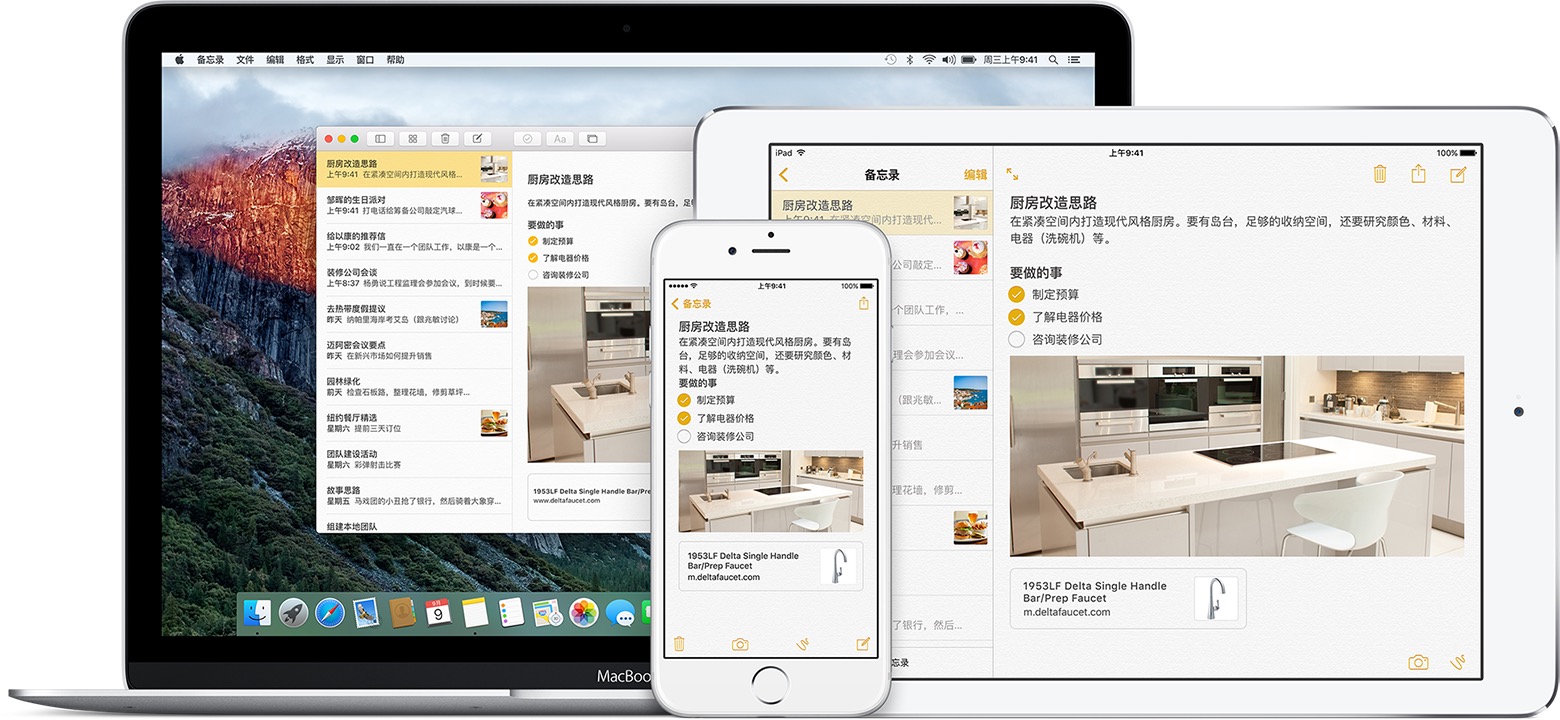
#Handoff技术介绍

Handoff是苹果“融合”主题中的重要元素之一,同时也是iOS8和OS X Yosemite中新的“Continuity”特征集的一部分。“Continuity”功能包含了能跨平台兼容的AirDrop、可在iPad和Mac上拨打iPhone电话和处理SMS信息,以及全新的更易使用的连接服务。无论你在做什么工作,无论你想要继续进行工作的设备是什么,苹果都试图通过透明、无缝的操作来实现这个想法,而不是试图通过一系列不同的设备来适应一个界面,也不是以云服务为中心。这是一个以用户为中心的大胆选择,一旦苹果正式提供这项功能,它可能将改变我们使用iPhone、iPad以及Mac的方式。所以,我们不禁要问,Handoff是如何工作的?

##在设备上使用相同的iCloud账户

为了让Handoff能够正常工作,你需要在iPhone、iPad或者Mac上使用相同的iCloud账户进行登录。这让Handoff知晓这些设备都属于同一个人——也就是你。由于iCloud账户(Apple ID)也同样被用来备份和恢复、使用iMessage和FaceTime、iCloud电子邮箱和存储在云中的文档,以及其他各种各样的功能,因此,这是一个安全、可靠的方式来确保当前用户和使用的设备不会出现错误匹配。

使用相同的iCloud账户进行登录同样也意味着:如果你的文档存储在iCloud里面,并且可以被所有设备使用,那么Handoff并不会浪费时间和流量来推送这些文件。Handoff仅仅只会推送你当前所进行的任务。

##Bluetooth LE 和距离

Handoff同时也需要你的iPhone、iPad或者Mac相互之间处于一个比较近的距离。当设备进入到一定范围内并且您当前正在进行的任务支持Handoff功能,设备将通过Bluetooth LE(低功耗蓝牙4.0)来自动配对。

使用比较近的距离可以让Handoff符合苹果的“以个人为中心”的目的。它将有效地保护你的隐私,比如正在浏览的网站、正在撰写的电子邮件或者消息,或者正在处理的文件。它保证这些任务将被推送到用你的账户登录的设备上,但是不会推送到不在你控制范围内的其他设备上面。比如说,如果你在家里工作,你不需要把你的任务推送到学校的设备上,或者你在咖啡店,你也不需要把任务推送到你的工作电脑上。

距离能够有效的支持便利性和保护隐私,两全其美不是吗?

##苹果应用程序和Handoff

到目前为止,苹果已经宣布,Handoff将支持以下应用:

1.邮件
2.Safari
3.Pages
4.Numbers
5.Keynote
6.地图
7.信息
8.提醒事项
9.日历
10.通讯录

有了它们,你就可以在Mac上编写、阅读电子邮件以及网页、编辑文档、展示表格和keynote、地图定位、输入文字、选择一个提醒事项、进行预约、或者查找地址,然后继续在你的iPhone或iPad完成这些工作,反之亦然。

苹果尚未宣布任何多媒体应用可以支持Handoff功能,例如启动Mac上的iTunes播放列表,然后在iTunes音乐应用上继续使用;或者你的iPhone上启动游戏,然后继续在iPad上进行游戏。苹果同样也没有宣布Handoff可以让你从Apple TV中推送一部电影到iPad,如果你想换房间看电影的话。(和AirPlay功能相反,AirPlay可以将你的iPhone、iPad或者Mac上的电影推送到Apple TV上。)

Handoff仍然处于起步阶段,它还有很多不足,但是,路要一步一步的走,来日方长。

##第三方应用和Handoff

苹果公司给开发者提供了相同的API(应用编程接口)来开发。开发者需要明确、谨慎地指定需要使用Handoff的任务,比如说写tweet或者阅读RSS文章,并且要保证所涉及到的应用程序都使用同样的开发者Team ID。这能够保护客户的隐私,因此我们就不必担心某个应用程序会影响推送的正常工作。

使用Handoff功能的应用程序必须有注册开发者的签名,并通过App Store的审核,或者在Mac上予以提供。再次重申,Handoff是安全的,甚至具有一定程度的灵活性。

##网站和Handoff

Handoff不仅能在应用程序间工作,它同样也能在网站和应用程序间工作。比如说,如果你正在Mac上的Safari浏览iMore.com或者Facebook.com,然后拿着你的iPhone离开了房间,iMore或者Facebook应用会提示你是否接受Handoff——假设开发者实现了这个功能。

开发者可以使用苹果提供的API来认证他们的网站和应用程序,并且将这两者关联起来。这个操作确认了Handoff功能使用的两个终端。

如果要在切换到浏览器中使用,Handoff将从始发设备发送一个URL(统一资源定位符)到你想要恢复工作的设备上面。然后这个设备将打开浏览器,加载这个URL,随后你就可以在浏览器上继续浏览之前看的网页了。

如果要在切换到本地应用中使用,网站上指定的任务将连接到关联的应用程序中的相应位置。即打开Facebook应用,加载你正在浏览的页面,随后你也可以在本地应用中继续浏览之前看的内容了。

##持续数据流(Continuation streams)

苹果还表示,开发者可以在两个不同设备的相同应用程序之间双向传输数据流。这使得设备间可以进行持续互动,包括读、写操作。例如,两个设备可以同时处理相同的任务,一个设备增减了文字,另一个设备也会同样进行相同的操作。

开发者和苹果如何利用这个持续数据流功能,还有待观察……

##图标显示位置

Handoff基于操作而工作。当一个应用或者浏览器进行加载、应用在后台运行或选项卡切换时,Handoff将会标识当前你正在做的操作——要么编写电子邮件、要么浏览特定的网页、要么编辑Pages文档,等等,随后Handoff将广播这些操作。

在一定距离内的其他设备将会识别该操作并且为其调出相应的图标。

在iPhone或者iPad上,这个图标放置于锁屏界面的左下角,或者放置在多任务选项卡界面(双击Home键得到的页面)中主屏的左边(设备解锁后)。

在Mac上,这个图标放置在Dock的左边,或者放置在应用程序切换栏的右边(按下Command+Tab得到的小窗口)。

当这个图标被选中之后,Handoff会向主设备的任务发出请求。如果你正在云中使用文档,那么只有文档位置会被传输。如果你正在浏览网站,那么只有URL会被传输。否则,无论你在处理什么内容都将会被全部传输过去。一旦所有必要的数据传输完成后(可能是直接通过Wi-Fi连接),应用程序将被运行,并且任务就会在你之前进行的地方运行。

比方说,如果你正在iPhone上编写电子邮件,并且你正在你的Mac的传输范围内,“邮件”应用将会出现在OS X的Dock左边的一个新部分中。单击之后你就可以在OS X中的“邮件”应用中继续编写你之前在iPhone上未完成的邮件了。

如果你正在Mac上使用Keynote,然后拿起你的iPad,你就会看到在锁屏界面的左下方出现了一个Keynote的应用图标。点击它,iPad上的Keynote就会运行,之前你在Mac上的Keynote所看到的内容将会出现在你的眼前。

##安全和隐私

苹果尚未说明Handoff是如何确保安全和保护隐私的。不过,由于苹果近期关于安全性和隐私性的历史动作来看,我们有充分的理由对其保持乐观。例如,苹果此前曾解释过AirDrop(另一个在Continuty阵营的服务)是如何确保安全和保护隐私的,这些解释令人印象深刻:

当用户启用AirDrop,一个2048位的RSA身份表示就会被存储在设备上。此外,基于与用户的Apple ID关联的电子邮件地址和电话号码的AirDrop身份标识哈希表将会被创建。

当用户选择AirDrop来共享某个项目时,设备将利用BTLE(Bluetooth LE)发出AirDrop信号。其他近距离的、激活AirDrop的设备将检测这个信号,并和所有者的身份标识哈希表的精简版进行回应。

Wi-Fi信号将被直接用来进行设备间的数据交流,并不会连接互联网或者建立Wi-Fi热点。

同样地,由于Handoff会在锁屏上显示,如何使用密码、Touch ID继续操作,以及是否允许Handoff在锁屏上显示,都可以在设置选项中进行处理。(出于安全方面考虑,BT LE和距离限制允许支持Handoff设备可以被确定为信任设备。)

Handoff实现了一个不同于微软的“Windows无处不在”以及谷歌的“一切尽在云中”的设备通信方法。借助Handoff,没有任何隐私会被保存在服务器当中。苹果保持了Mac和Mac通信,iPhone和iPad通信的独立性。他们仅仅只是在形式上整合在了一起,但是无论你走到哪里,你设备间的任务都将透明、无缝地进行连接。

#Handoff编程

Handoff能够让用户在一台设备上开始某个任务,然后到另一个设备上矩形完成某个任务.
Handoff本意就是手递手,即将一个任务从一个设备传递给另一个设备.
Handoff是基于多点连接技术,它能够自动发现其他处于广播状态的设备,并进行通信.
通过 Handoff,您可以在一台设备上开始撰写文稿、电子邮件或信息,然后转到另一设备上继续进行。

##使用Handoff的要求:

1.2012年后的MacBook Air,MacBook Pro,iMac,Mac mini;2013年之后Mac Pro等,必须运行 Mac OS X 10以及更高的版本.
2.iOS设备必须是iPhone5以及更高,iPad Air等,系统必须是iOS8及更高版本.
3.传递过程是采用蓝牙,因此需要设备开启蓝牙,并且设备之间的距离应在10米内.这些设计都是在iCloud设置面板中登陆相同的Apple ID. Handoff
所在的应用在数字签名时候,必须使用相同的团队标示(Team ID)

##设置Handoff

1.Mac OS X 的设置方法是 打开’系统偏好设置’>’通用’设置界面 > ‘允许在这台Mac 和 iCloud设计之间使用Handoff’
2.iOS 设备开启Handoff,则打开设置应用的’通用’>’Handoff于建议的应用程序’

使用Handoff

1.在其中一台设备上,打开兼容应用,如“邮件”或 Pages。
2.使用该应用开始一项任务,如撰写电子邮件或文稿。
3.然后,您可以切换到其他 iOS 或 Mac 上。

如果切换到 Mac,您可以按 Command-Tab 从离开的位置继续,或者您可以点按 Dock 中的应用图标:

#Handoff工作原理

这种在设备之间传递的任务被称为”用户活动”(User Activity),用户活动可以在设备之间通过Handoff技术传递.
用户在原始设备上打开Safari浏览器,然后创建用户活动对象,用户活动对象可以使用userInfo属性传递数据或流, userInfo中的数据包括: NSArray,NSData,NSDate,NSDictionary,NSNull,NSNumber,NSSet,NSString,NSURL;
userInfo中的流可以传递文件.原始设备会关闭用户活动,其他附件的设备(与原始设备采用相同的iCloud账号登陆)可以接受用户活动.

Handoff API
Handoff 没有一个独立的框架,设计的类只有一个NSUserActivity, 就是 用户活动类.

NSUserActivity类

1
2
3
4
5
6
7
8
9
10
11
12
13
14
15
16
17
18
19
20
21
22
23
24
25
26
27
28
29
30
31
32
33
34
35
36
37
38
39
40
41
42
43
44
45
46
47
48
49
50
51
52
53
54
55
56
57
58
59
60
61
62
63
64
65
66
67
68
69
70
71
72
73
74
75
76
77
78
79
80
81
82
83
84
public class NSUserActivity : NSObject {

/* Initializes and returns a newly created NSUserActivity with the given activityType. A user activity may be continued only in an application that (1) has the same developer Team ID as the activity's source application and (2) supports the activity's type. Supported activity types are specified in the application's Info.plist under the NSUserActivityTypes key. When receiving a user activity for continuation, the system locates the appropriate application to launch by finding applications with the target Team ID, then filtering on the incoming activity's type identifier.
*/
public init(activityType: String)

/* Initializes and returns a newly created NSUserActivity with the first activityType from the NSUserActivityTypes key in the application’s Info.plist.
*/
public init()

/* The activityType the user activity was created with.
*/
public var activityType: String { get }

/* An optional, user-visible title for this activity, such as a document name or web page title.
*/
public var title: String?

/* The userInfo dictionary contains application-specific state needed to continue an activity on another device. Each key and value must be of the following types: NSArray, NSData, NSDate, NSDictionary, NSNull, NSNumber, NSSet, NSString, NSURL, or NSUUID. File scheme URLs which refer to iCloud documents may be translated to valid file URLs on a receiving device.
*/
public var userInfo: [NSObject : AnyObject]?

/* Adds to the userInfo dictionary the entries from otherDictionary. The keys and values must be of the types allowed in the userInfo
*/
public func addUserInfoEntriesFromDictionary(otherDictionary: [NSObject : AnyObject])

/* The keys from the userInfo property which represent the minimal information about this user activity that should be stored for later restoration */
@available(iOS 9.0, *)
public var requiredUserInfoKeys: Set<String>

/* If set to YES, then the delegate for this user activity will receive a userActivityWillSave: callback before being sent for continuation on another device.
*/
public var needsSave: Bool

/* When no suitable application is installed on a resuming device and the webPageURL is set, the user activity will instead be continued in a web browser by loading this resource.
*/
@NSCopying public var webpageURL: NSURL?

/* If non-nil, then an absolute date after which this activity is no longer eligible to be indexed or handed off. */
@available(iOS 9.0, *)
@NSCopying public var expirationDate: NSDate

/* A set of NSString* keywords, representing words or phrases in the current user's language that might help the user to find this activity in the application history. */
@available(iOS 9.0, *)
public var keywords: Set<String>

/* When used for continuation, the user activity can allow the continuing side to connect back for more information using streams. This value is set to NO by default. It can be dynamically set to YES to selectively support continuation streams based on the state of the user activity.
*/
public var supportsContinuationStreams: Bool

/* The user activity delegate is informed when the activity is being saved or continued (see NSUserActivityDelegate, below)
*/
weak public var delegate: NSUserActivityDelegate?

/* Marks the receiver as the activity currently in use by the user, for example, the activity associated with the active window. A newly created activity is eligible for continuation on another device after the first time it becomes current.
*/
public func becomeCurrent()

/* If this activity is the current activity, it should stop being so and set the current activity to nothing. */
@available(iOS 9.0, *)
public func resignCurrent()

/* Invalidate an activity when it's no longer eligible for continuation, for example, when the window associated with an activity is closed. An invalid activity cannot become current.
*/
public func invalidate()

/* When an app is launched for a continuation event it can request streams back to the originating side. Streams can only be successfully retrieved from the NSUserActivity in the NS/UIApplication delegate that is called for a continuation event. This functionality is optional and is not expected to be needed in most continuation cases. The streams returned in the completion handler will be in an unopened state. The streams should be opened immediately to start requesting information from the other side.
*/
public func getContinuationStreamsWithCompletionHandler(completionHandler: (NSInputStream?, NSOutputStream?, NSError?) -> Void)

/* Set to YES if this user activity should be eligible to be handed off to another device */
@available(iOS 9.0, *)
public var eligibleForHandoff: Bool

/* Set to YES if this user activity should be indexed by App History */
@available(iOS 9.0, *)
public var eligibleForSearch: Bool

/* Set to YES if this user activity should be eligible for indexing for any user of this application, on any device, or NO if the activity contains private or sensitive information or which would not be useful to other users if indexed.
The activity must also have requiredUserActivityKeys or a webpageURL */
@available(iOS 9.0, *)
public var eligibleForPublicIndexing: Bool
}

NSUserActivityTypeBrowsingWeb 字符串

1
2
3
4
5
6
7
/* The activity type used when continuing from a web browsing session to either a web browser or a native app.
Only activities of this type can be continued from a web browser to a native app.
*/
@available(iOS 8.0, *)
public let NSUserActivityTypeBrowsingWeb: String


NSUserActivityDelegate协议

1
2
3
4
5
6
7
8
9
10
11
12
13
14
15
16
17
18
19
20
21
/* The user activity delegate is responsible for updating the state of an activity and is also notified when an activity has been continued on another device.
*/

@available(iOS 8.0, *)
public protocol NSUserActivityDelegate : NSObjectProtocol {

/* The user activity will be saved (to be continued or persisted).
The receiver should update the activity with current activity state.
*/
optional public func userActivityWillSave(userActivity: NSUserActivity)

/* The user activity was continued on another device.
*/
optional public func userActivityWasContinued(userActivity: NSUserActivity)

/* If supportsContinuationStreams is set to YES the continuing side can request streams back to this user activity.
This delegate callback will be received with the incoming streams from the other side. The streams will be in an unopened state. The streams should be opened immediately to start receiving requests from the continuing side.
*/
optional public func userActivity(userActivity: NSUserActivity?, didReceiveInputStream inputStream: NSInputStream, outputStream: NSOutputStream)
}

##Handoff编程的一般流程:

原始设备
开始
1.实例化NSUserActivity对象
2.调用NSUserActivity的becomeCurrent方法
3.用户活动状态改变
4.NSUserActivityDelegate的userActivityWillSave:方法被调用

其他设备
5.实例化 NSUserActivity对象
6.调用NSUserActivity的becomeCurrent()方法成为当前活动者
7.UIApplicationDelegate的application:continueUserAcitivity:restorationHandler:方法被调用
8.UIResponder的restoreUserActivityState:方法被调用

结束

上述流程可以分为 两个阶段: 原始设备创建用户活动和用户活动继续传递到其他设备.

第一个阶段原始设备实例化NSUserActivity 对象创建用户活动,并调用NSUserActivity的becomeCurrent()方法称为当前活动者.

第二阶段中用户可用改变活动状态,这时NSUserActivityDelegate的userActivytyWillSave:方法调用,然后活动调用数据继续传递到其他设备,其他设备也需要实例化NSUserActivity对象创建,调用becomeCurrent方法称为当前活动者,接着UIApplicationDelegate的application:continueUserActivity:restorationHandler: 方法被调用,这个方法中需要返回,并将需要恢复状态的UIResponder对象集合传递给restorationHandler闭包.根据restorationHandler闭包中的UIResponder对象,调用UIResponder对象的restoreUserActivityState:方法.

编程实例

AppDelegate.swift

1
2
3
4
5
6
7
8
9
10
11
12
13
14
15
16

func application(application: UIApplication, continueUserActivity userActivity: NSUserActivity, restorationHandler: ([AnyObject]?) -> Void) -> Bool {


if let rootViewController = self.window?.rootViewController as? UINavigationController {

if let viewController = rootViewController.topViewController as? ViewController {
restorationHandler([viewController])

return true
}
}
return false

}

Info.plist 文件中添加 NSUserActivityTypes 数组
item0内容填入 cn.williamxie.HandoffDemo

ViewController.swift

1
2
3
4
5
6
7
8
9
10
11
12
13
14
15
16
17
18
19
20
21
22
23
24
25
26
27
28
29
30
31
32
33
34
35
36
37
38
39
40
41
42
43
44
45
46
47
48
49
50
51
52
53
54
55
56
57
58
59
60
61
62
63
64
65
66
67
68
69
70
71
72
73
74
75
76
77
78
79
80
81
82
83
84
let controllerActivityType = "cn.williamxie.HandoffDemo"
let powerSwitchKey = "powerSwitch_key"
let brightnessSilderKey = "brightnessSilder_key"

class ViewController: UIViewController, NSUserActivityDelegate {

var activity : NSUserActivity?

@IBOutlet weak var powerSwitch: UISwitch!

@IBOutlet weak var brightnessSilder: UISlider!

@IBOutlet weak var brightnessValue: UILabel!

override func viewDidLoad() {
super.viewDidLoad()
}

override func viewWillAppear(animated: Bool) {

super.viewWillAppear(animated)

//实例化activity对象
self.activity = NSUserActivity(activityType: controllerActivityType)
self.activity!.userInfo = getActivityInfoData()
self.activity!.title = "灯泡控制器"
self.activity!.delegate = self

self.activity!.becomeCurrent()

}

override func viewWillDisappear(animated: Bool) {

super.viewWillDisappear(animated)

self.activity!.invalidate()
self.activity!.delegate = nil
}

override func didReceiveMemoryWarning() {
super.didReceiveMemoryWarning()
}

//准备activity中的数据
func getActivityInfoData() -> [String : AnyObject] {

var activityInfo = [String : AnyObject]()
activityInfo[powerSwitchKey] = powerSwitch.on
activityInfo[brightnessSilderKey] = brightnessSilder.value

return activityInfo
}

@IBAction func switchValueChanged(sender: AnyObject) {
self.activity!.needsSave = true
}

@IBAction func silderValueChanged(sender: AnyObject) {
let newValue = self.brightnessSilder.value
self.brightnessValue.text = String(format: "%0.0f", newValue)
self.activity!.needsSave = true
}

//MARK: --实现NSUserActivityDelegate协议方法
func userActivityWillSave(userActivity: NSUserActivity) {
userActivity.userInfo = getActivityInfoData()
}

override func restoreUserActivityState(activity: NSUserActivity) {
if activity.activityType == controllerActivityType {

let info = activity.userInfo as! [String : AnyObject]
let switchValue = info[powerSwitchKey] as! Bool
let silderValue = info[brightnessSilderKey] as! Float

self.powerSwitch.setOn(switchValue, animated: true)
self.brightnessSilder.value = silderValue
self.brightnessValue.text = String(format: "%0.0f", silderValue)
}
}
}